# Virtual Private Cloud (VPC)
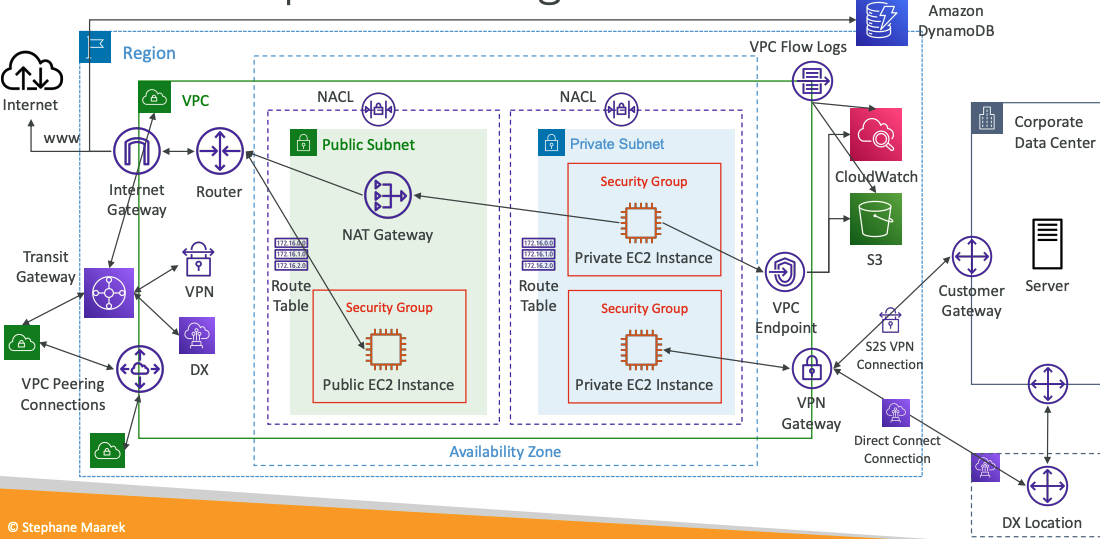
# VPC Components Diagram
# Understanding CIDR – IPv4
- Classless Inter-Domain Routing – a method for allocating IP addresses
- Used in Security Groups rules and AWS networking in general
| IP Version | Type | Protocol | Port range | Source | Description |
|---|---|---|---|---|---|
| IPv4 | SSH | TCP | 22 | 122.149.196.85/32 | - |
| IPv4 | HTTP | TCP | 80 | 0.0.0.0/0 | - |
They help to define an IP address range:
- We’ve seen
WW.XX.YY.ZZ/32=> one IP - We’ve seen
0.0.0.0/0=> all IPs - But we can define:
192.168.0.0/26=>192.168.0.0 – 192.168.0.63(64 IP addresses)
# A CIDR consists of two components
- Base IP
- Represents an IP contained in the range (XX.XX.XX.XX)
- Example: 10.0.0.0, 192.168.0.0, …
- Subnet Mask
- Defines how many bits can change in the IP
- Example:
/0,/24,/32 - Can take two forms:
- /8 <=> 255.0.0.0
- /16 <=> 255.255.0.0
- /24 <=> 255.255.255.0
- /32 <=> 255.255.255.255
# Subnet Mask
The Subnet Mask basically allows part of the underlying IP to get additional next values from the base IP
Quick Memo
Octets 1st 2nd 3rd 4th
/32- no octet can change/24- last octet can change/16- last 2 octets can change/8- last 3 octets can change/0- all octets can change
# Public vs. Private IP (IPv4)
- The Internet Assigned Numbers Authority (IANA) established certain blocks of IPv4 addresses for the use of private (LAN) and public (Internet) addresses
- Private IP can only allow certain values:
- 10.0.0.0 – 10.255.255.255 (10.0.0.0/8) - in big networks
- 172.16.0.0 – 172.31.255.255 (172.16.0.0/12) -
AWS default VPC in that range - 192.168.0.0 – 192.168.255.255 (192.168.0.0/16) - e.g., home networks
- All the rest of the IP addresses on the Internet are Public
# Default VPC Walkthrough
- All new AWS accounts have a default VPC
- New EC2 instances are launched into the default VPC if no subnet is specified
- Default VPC has Internet connectivity and all EC2 instances inside it have public IPv4 addresses
- We also get a public and a private IPv4 DNS names
# VPC in AWS – IPv4
- You can have multiple VPCs in an AWS region (max. 5 per region – soft limit)
- Max. CIDR per VPC is 5, for each CIDR:
- Min. size is /28 (16 IP addresses)
- Max. size is /16 (65536 IP addresses)
- Because VPC is private, only the Private IPv4 ranges are allowed:
- 10.0.0.0 – 10.255.255.255 (10.0.0.0/8)
- 172.16.0.0 – 172.31.255.255 (172.16.0.0/12)
- 192.168.0.0 – 192.168.255.255 (192.168.0.0/16)
- Your VPC CIDR should NOT overlap with your other networks (e.g., corporate)
# VPC – Subnet (IPv4)
- AWS reserves 5 IP addresses (first 4 & last 1) in each subnet
- These 5 IP addresses are not available for use and can’t be assigned to an EC2 instance
- Example: if CIDR block 10.0.0.0/24, then reserved IP addresses are:
- 10.0.0.0 – Network Address
- 10.0.0.1 – reserved by AWS for the VPC router
- 10.0.0.2 – reserved by AWS for mapping to Amazon-provided DNS
- 10.0.0.3 – reserved by AWS for future use
- 10.0.0.255 – Network broadcast Address. AWS does not support broadcast in a VPC, therefore the address is reserved
Exam Tip
if you need 29 IP addresses for EC2 instances:
- You can’t choose a subnet of size /27 (32 IP addresses, 32 – 5 = 27 < 29)
- You need to choose a subnet of size /26 (64 IP addresses, 64 – 5 = 59 > 29)
# Internet Gateway (IGW)
- Allows resources (e.g., EC2 instances) in a VPC connect to the Internet
- It scales horizontally and is highly available and redundant
- Must be created separately from a VPC
- One VPC can only be attached to one IGW and vice versa
- Internet Gateways on their own do not allow Internet access…
- Route tables must also be edited!
# Bastion Hosts
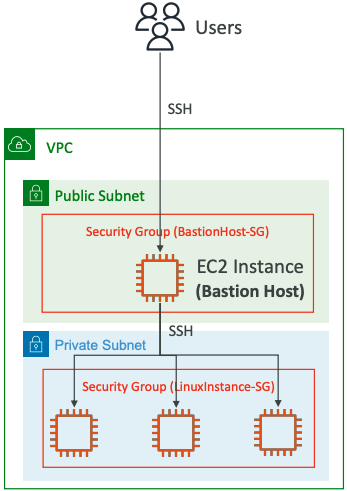
- We can use a Bastion Host to SSH into our private EC2 instances
- The bastion is in the public subnet which is then connected to all other private subnets
- Bastion Host security group must allow inbound from the internet on port 22 from restricted CIDR, for example the public CIDR of your corporation
- Security Group of the EC2 Instances must allow the Security Group of the Bastion Host, or the private IP of the Bastion host
# NAT Gateway
- AWS-managed NAT, higher bandwidth, high availability, no administration
- Pay per hour for usage and bandwidth
- NATGW is created in a specific Availability Zone, uses an Elastic IP
- Can’t be used by EC2 instance in the same subnet (only from other subnets)
- Requires an IGW (Private Subnet => NATGW => IGW)
- 5 Gbps of bandwidth with automatic scaling up to 45 Gbps
- No Security Groups to manage / required
# NAT Gateway with High Availability
- NAT Gateway is resilient within a single Availability Zone
- Must create multiple NAT Gateways in multiple AZs for fault-tolerance
- There is no cross-AZ failover needed because if an AZ goes down it doesn't need NAT
# NAT Gateway vs. NAT Instance
| . | NAT Gateway | NAT Instance (outdated) |
|---|---|---|
| Availability | Highly available within AZ (create in another AZ) | Use a script to manage failover between instances |
| Bandwidth | Up to 45 Gbps | Depends on EC2 instance type |
| Maintenance | Managed by AWS | Managed by you (e.g., software, OS patches, …) |
| Cost | Per hour & amount of data transferred | Per hour, EC2 instance type and size, + network $ |
| Public IPv4 | ✅ | ✅ |
| Private IPv4 | ✅ | ✅ |
| Security Groups | ❌ | ✅ |
| Use as Bastion Host? | ❌ | ✅ |
Compare NAT gateways and NAT instances (opens new window)
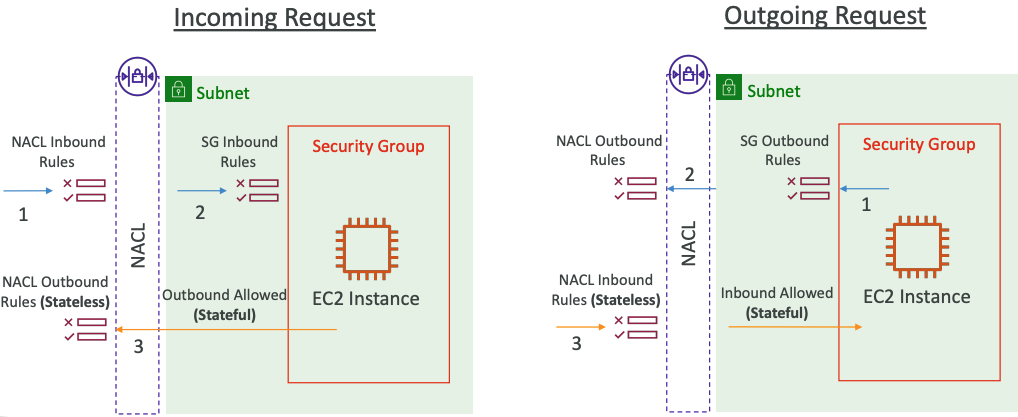
# Security Groups & NACLs
# Network Access Control List (NACL)
- NACL are like a firewall which control traffic from and to subnets
- One NACL per subnet, new subnets are assigned the Default NACL
- You define NACL Rules:
- Rules have a number (1-32766), higher precedence with a lower number
- First rule match will drive the decision
- Example: if you define
#100 ALLOW 10.0.0.10/32and#200 DENY 10.0.0.10/32, the IP address will be allowed because 100 has a higher precedence over 200 - The last rule is an asterisk (*) and denies a request in case of no rule match
- AWS recommends adding rules by increment of 100
- Newly created NACLs will deny everything
- NACL are a great way of blocking a specific IP address at the subnet level
# Default NACL
- Accepts everything inbound/outbound with the subnets it’s associated with
- Do NOT modify the Default NACL, instead create custom NACLs
Default NACL for a VPC that supports IPv4
Inbound Rules
| Rule # | Type | Protocol | Port Range | Source | Allow /Deny |
|---|---|---|---|---|---|
| 100 | All IPv4 Traffic | All | All | 0.0.0.0/0 | ALLOW |
* | All IPv4 Traffic | All | All | 0.0.0.0/0 | DENY |
Outbound Rules
| Rule # | Type | Protocol | Port Range | Source | Allow /Deny |
|---|---|---|---|---|---|
| 100 | All IPv4 Traffic | All | All | 0.0.0.0/0 | ALLOW |
* | All IPv4 Traffic | All | All | 0.0.0.0/0 | DENY |
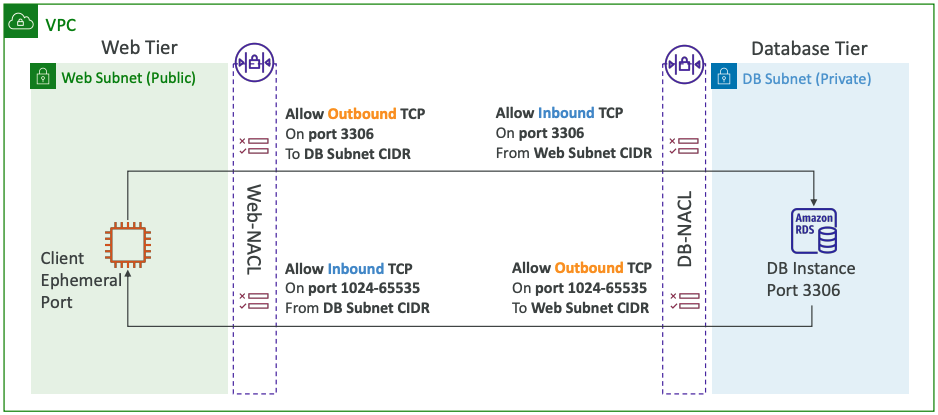
# Ephemeral Ports
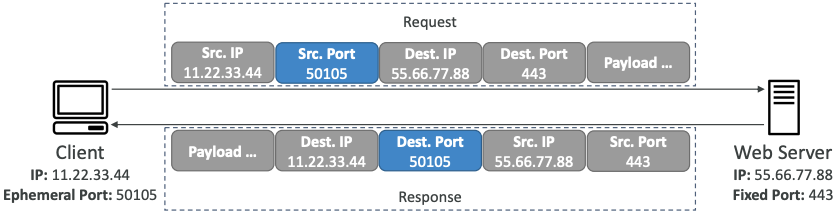
- For any two endpoints to establish a connection, they must use ports
- Clients connect to a defined port, and expect a response on an ephemeral port
- Different Operating Systems use different port ranges, examples:
- IANA & MS Windows 10 => 49152 – 65535
- Many Linux Kernels => 32768 – 60999
# NACL with Ephemeral Ports
# Security Group vs. NACLs
| Security Group | NACL |
|---|---|
| Operates at the instance level | Operates at the subnet level |
| Supports allow rules only | Supports allow rules and deny rules |
| Stateful: return traffic is automatically allowed, regardless of any rules | Stateless: return traffic must be explicitly allowed by rules (think of ephemeral ports) |
| All rules are evaluated before deciding whether to allow traffic | Rules are evaluated in order (lowest to highest) when deciding whether to allow traffic, first match wins |
| Applies to an EC2 instance when specified by someone | Automatically applies to all EC2 instances in the subnet that it’s associated with |
Control traffic to subnets using network ACLs (opens new window)
# VPC Peering
- Privately connect two VPCs using AWS’network
- Make them behave as if they were in the same network
- Must not have overlapping CIDRs
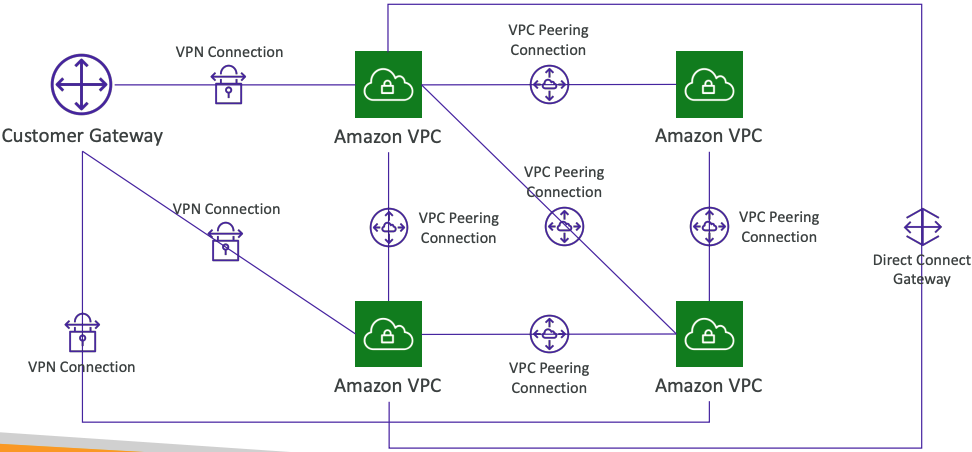
- VPC Peering connection is NOT transitive (must be established for each VPC that need to communicate with one another)
- You must update route tables in each VPC’s subnets to ensure EC2 instances can communicate with each other
# Good to know
- You can create VPC Peering connection between VPCs in different AWS accounts/regions
- You can reference a security group in a peered VPC (works cross accounts – same region)
| Type | Protocol | Port range | Source |
|---|---|---|---|
| HTTP | TCP | 80 | sg004991f9af3474b9349 / default |
| HTTP | TCP | 80 | [Account ID] / sg-023af754235vhdsfcsdf |
# VPC Endpoints
# Types of Endpoints
Interface Endpoints (powered by PrivateLink)
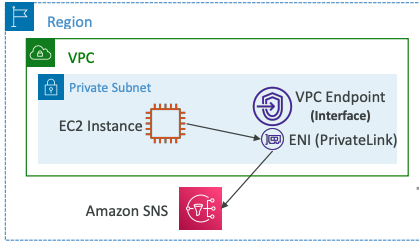
- Provisions an ENI (private IP address) as an entry point (must attach a Security Group)
- Supports most AWS services
- $ per hour + $ per GB of data processed
Gateway Endpoints
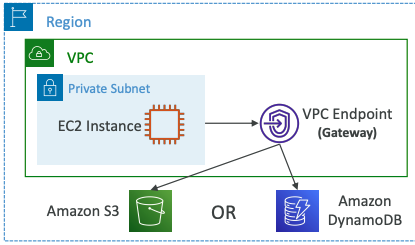
- Provisions a gateway and must be used as a target in a route table (does not use security groups)
- Supports both S3 and DynamoDB
- Free
# VPC Endpoints - AWS PrivateLink
- Every AWS service is publicly exposed (public URL)
- VPC Endpoints (powered by AWS PrivateLink) allows you to connect to AWS services using a private network instead of using the public Internet
- They’re redundant and scale horizontally
- They remove the need of IGW, NATGW, … to access AWS Services
- In case of issues:
- Check DNS Setting Resolution in your VPC
- Check Route Tables
# Gateway or Interface Endpoint for S3?
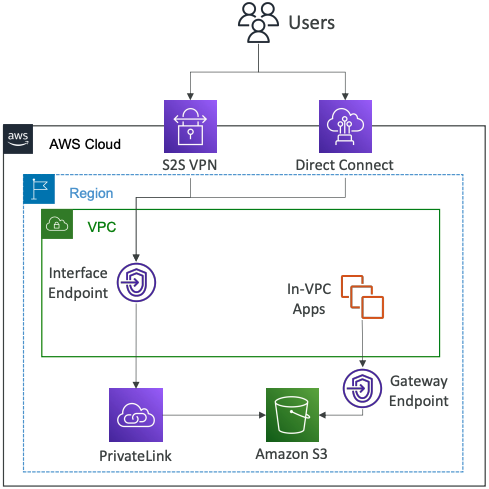
- Gateway is most likely going to be preferred all the time at the exam
- Cost: free for Gateway, $ for interface endpoint
- Interface Endpoint is preferred access is required from onpremises (Site to Site VPN or Direct Connect), a different VPC or a different region
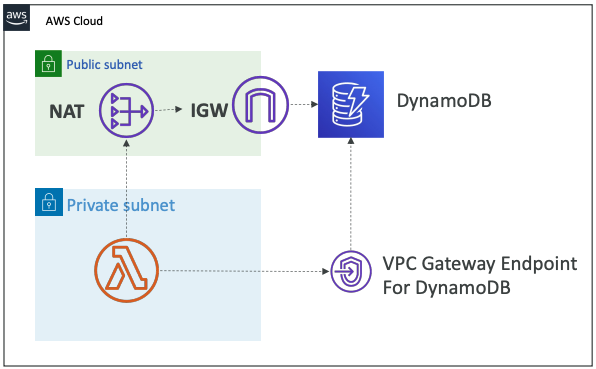
# Lambda in VPC accessing DynamoDB
- DynamoDB is a public service from AWS
- Option 1: Access from the public internet
- Because Lambda is in a VPC, it needs a NAT Gateway in a public subnet and an internet gateway
- Option 2 (better & free): Access from the private VPC network
- Deploy a VPC Gateway endpoint for DynamoDB
- Change the Route Tables
# VPC Flow Logs
- Capture information about IP traffic going into your interfaces:
- VPC Flow Logs
- Subnet Flow Logs
- Elastic Network Interface (ENI) Flow Logs
- Helps to monitor & troubleshoot connectivity issues
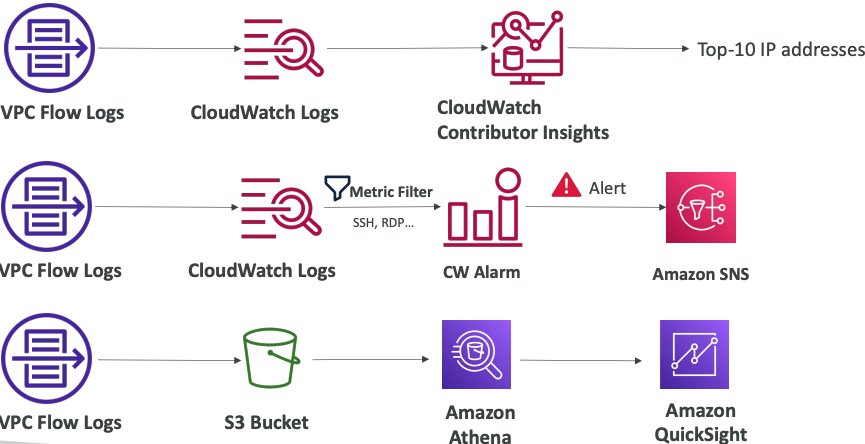
- Flow logs data can go to S3, CloudWatch Logs, and Kinesis Data Firehose
- Captures network information from AWS managed interfaces too: ELB, RDS, ElastiCache, Redshift, WorkSpaces, NATGW, Transit Gateway…
# VPC Flow Logs Syntax

- srcaddr & dstaddr – help identify problematic IP
- srcport & dstport – help identity problematic ports
- Action – success or failure of the request due to Security Group / NACL
- Can be used for analytics on usage patterns, or malicious behavior
- Query VPC flow logs using Athena on S3 or CloudWatch Logs Insights -Flow Logs examples (opens new window)
# Troubleshoot SG & NACL issues
Look at the “ACTION” field
Incoming Requests
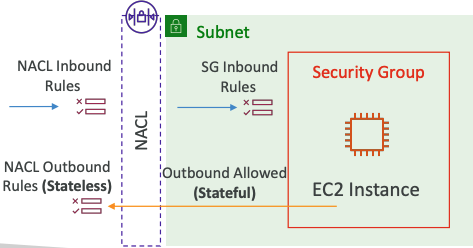
- Inbound REJECT => NACL or SG
- Inbound ACCEPT, Outbound REJECT => NACL
Outgoing Requests
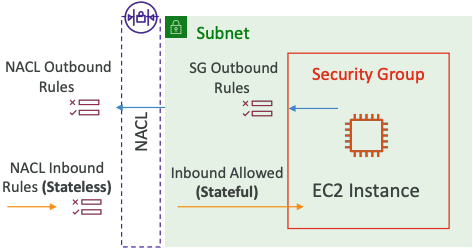
- Outbound REJECT => NACL or SG
- Outbound ACCEPT, Inbound REJECT => NACL
# VPC Flow Logs – Architectures
# AWS Site-to-Site VPN
Virtual Private Gateway (VGW)
- VPN concentrator on the AWS side of the VPN connection
- VGW is created and attached to the VPC from which you want to create the Site-to-Site VPN connection
- Possibility to customize the ASN (Autonomous System Number)
Customer Gateway (CGW)
- Software application or physical device on customer side of the VPN connection -Your CGW (opens new window)
# Site-to-Site VPN Connections
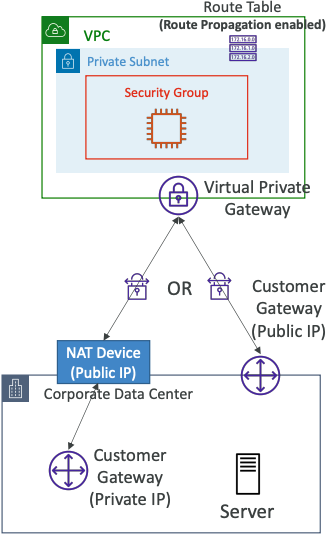
- Customer Gateway Device (On-premises)
- What IP address to use?
- Public Internet-routable IP address for your Customer Gateway device
- If it’s behind a NAT device that’s enabled for NAT traversal (NAT-T), use the public IP address of the NAT device
- What IP address to use?
- Important step: enable Route Propagation for the Virtual Private Gateway in the route table that is associated with your subnets
- If you need to ping your EC2 instances from on-premises, make sure you add the ICMP protocol on the inbound of your security groups
# AWS VPN CloudHub
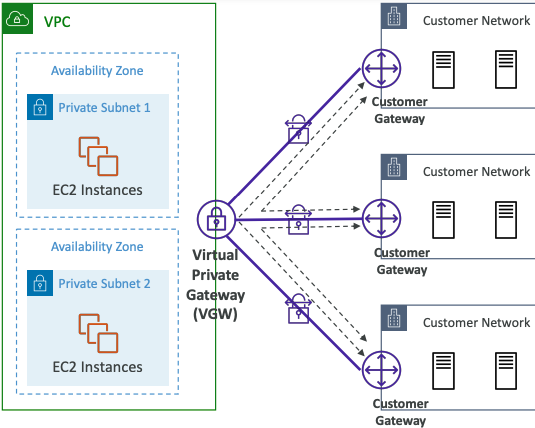
- Provide secure communication between multiple sites, if you have multiple VPN connections
- Low-cost hub-and-spoke model for primary or secondary network connectivity between different locations (VPN only)
- It’s a VPN connection so it goes over the public Internet
- To set it up, connect multiple VPN connections on the same VGW, setup dynamic routing and configure route tables
# Direct Connect (DX)
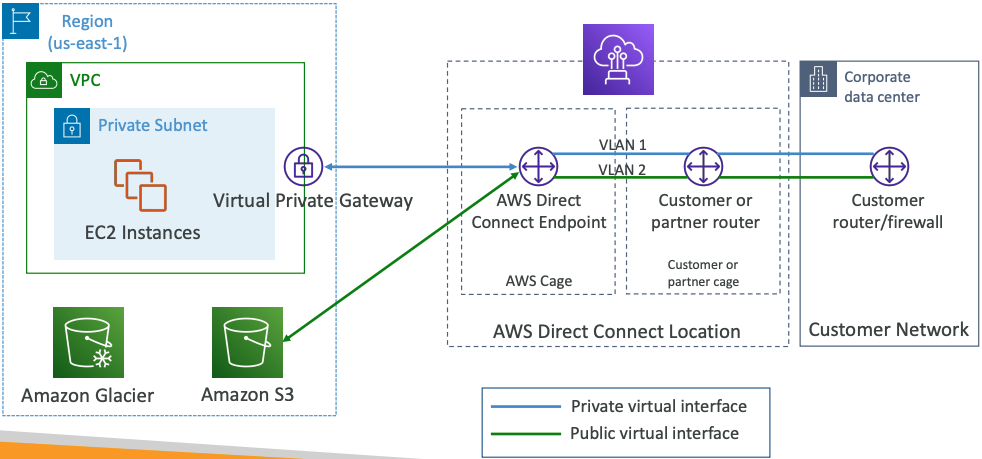
- Provides a dedicated private connection from a remote network to your VPC
- Dedicated connection must be setup between your DC and AWS Direct Connect locations
- You need to setup a Virtual Private Gateway on your VPC
- Access public resources (S3) and private (EC2) on same connection
- Use Cases:
- Increase bandwidth throughput - working with large data sets – lower cost
- More consistent network experience - applications using real-time data feeds
- Hybrid Environments (on prem + cloud)
- Supports both IPv4 and IPv6
# Direct Connect Gateway
If you want to setup a Direct Connect to one or more VPC in many different regions (same account), you must use a Direct Connect Gateway
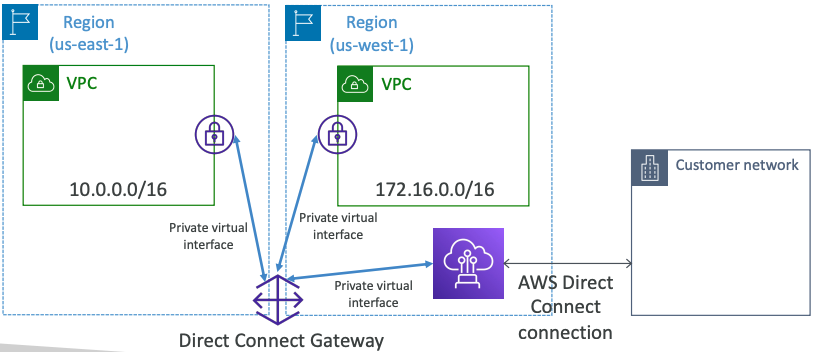
# Direct Connect – Connection Types
- Dedicated Connections: 1Gbps,10 Gbps and 100 Gbps capacity
- Physical ethernet port dedicated to a customer
- Request made to AWS first, then completed by AWS Direct Connect Partners
- Hosted Connections: 50Mbps, 500 Mbps, to 10 Gbps
- Connection requests are made via AWS Direct Connect Partners
- Capacity can be added or removed on demand
- 1, 2, 5, 10 Gbps available at select AWS Direct Connect Partners
- Lead times are often longer than 1 month to establish a new connection
# Direct Connect – Encryption
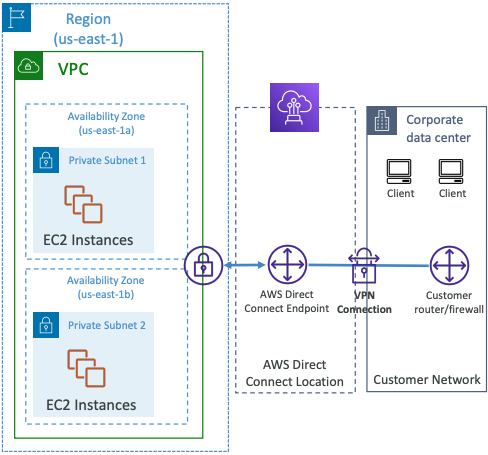
- Data in transit is not encrypted but is private
- AWS Direct Connect + VPN provides an IPsec-encrypted private connection
- Good for an extra level of security, but slightly more complex to put in place
# Direct Connect - Resiliency
High Resiliency for Critical Workloads
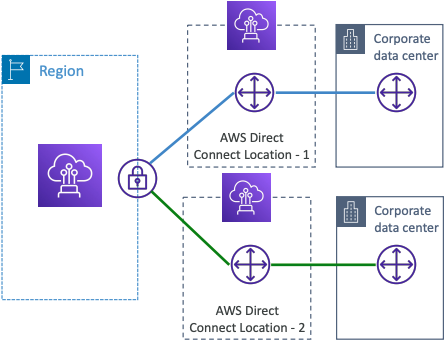
One connection at multiple locations
Maximum Resiliency for Critical Workloads
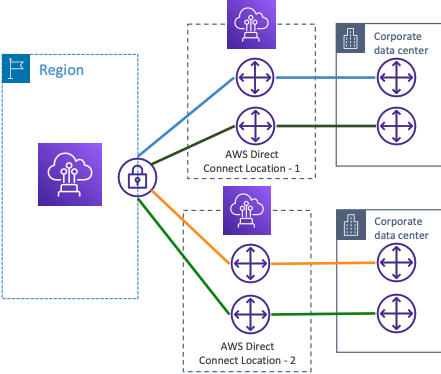
Maximum resilience is achieved by separate connections terminating on separate devices in more than one location.
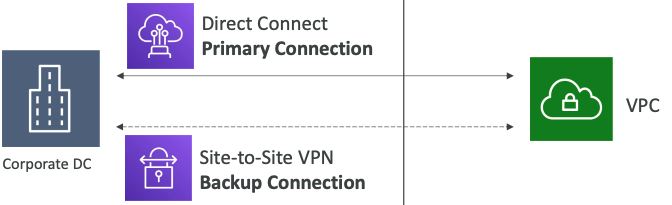
# Site-to-Site VPN connection as a backup
In case Direct Connect fails, you can set up a backup Direct Connect connection (expensive), or a Site-to-Site VPN connection
# Network topologies can become complicated
# Transit Gateway
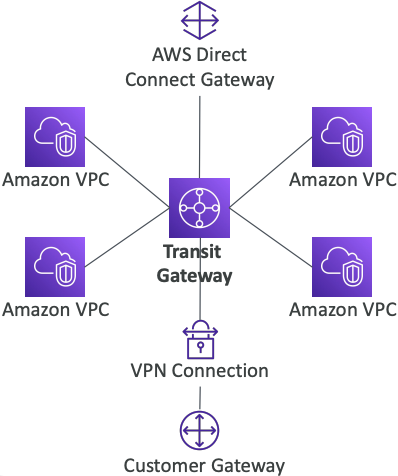
- For having transitive peering between thousands of VPC and on-premises, hub-and-spoke (star) connection
- Regional resource, can work cross-region
- Share cross-account using Resource Access Manager (RAM)
- You can peer Transit Gateways across regions
- Route Tables: limit which VPC can talk with other VPC
- Works with Direct Connect Gateway, VPN connections
- Supports IP Multicast (not supported by any other AWS service)
# Transit Gateway: Site-to-Site VPN ECMP
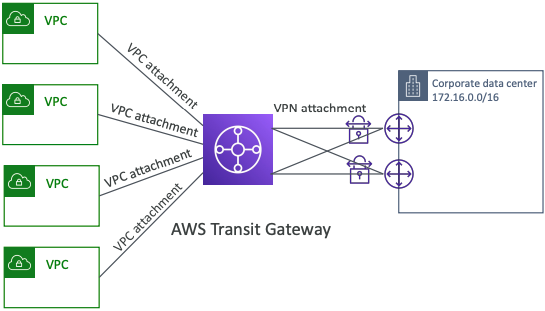
- ECMP = Equal-cost multi-path routing
- Routing strategy to allow to forward a packet over multiple best path
- Use case: create multiple Siteto-Site VPN connections to increase the bandwidth of your connection to AWS
# VPC – Traffic Mirroring
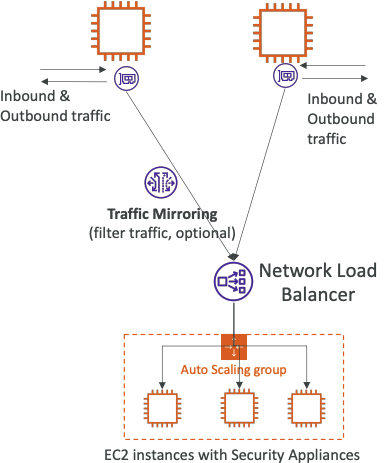
- Allows you to capture and inspect network traffic in your VPC
- Route the traffic to security appliances that you manage
- Capture the traffic
- From (Source) – ENIs
- To (Targets) – an ENI or a Network Load Balancinger
- Capture all packets or capture the packets of your interest (optionally, truncate packets)
- Source and Target can be in the same VPC or different VPCs (VPC Peering)
- Use cases: content inspection, threat monitoring, troubleshooting, …
# What is IPv6?
- IPv4 designed to provide 4.3 Billion addresses (they’ll be exhausted soon)
- IPv6 is the successor of IPv4
- IPv6 is designed to provide 3.4 × 1038, unique IP addresses
- Every IPv6 address is public and Internet-routable (no private range)
- Format =>
x.x.x.x.x.x.x.x(x is hexadecimal, range can be from0000toffff) - Examples:
2001:db8:3333:4444:5555:6666:7777:88882001:db8:3333:4444:cccc:dddd:eeee:ffff::=> all 8 segments are zero2001:db8::=> the last 6 segments are zero::1234:5678=> the first 6 segments are zero2001:db8::1234:5678=> the middle 4 segments are zero
# IPv6 in VPC
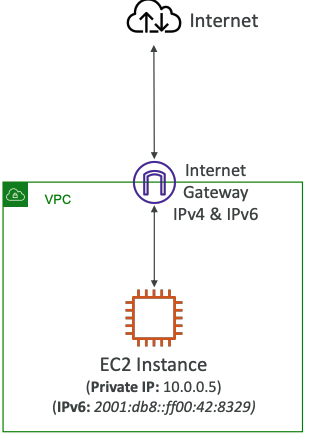
- IPv4 cannot be disabled for your VPC and subnets
- You can enable IPv6 (they’re public IP addresses) to operate in dual-stack mode
- Your EC2 instances will get at least a private internal IPv4 and a public IPv6
- They can communicate using either IPv4 or IPv6 to the internet through an Internet Gateway
# IPv6 Troubleshooting
- IPv4 cannot be disabled for your VPC and subnets
- So, if you cannot launch an EC2 instance in your subnet
- It’s not because it cannot acquire an IPv6 (the space is very large)
- It’s because there are no available IPv4 in your subnet
- Solution: create a new IPv4 CIDR in your subnet
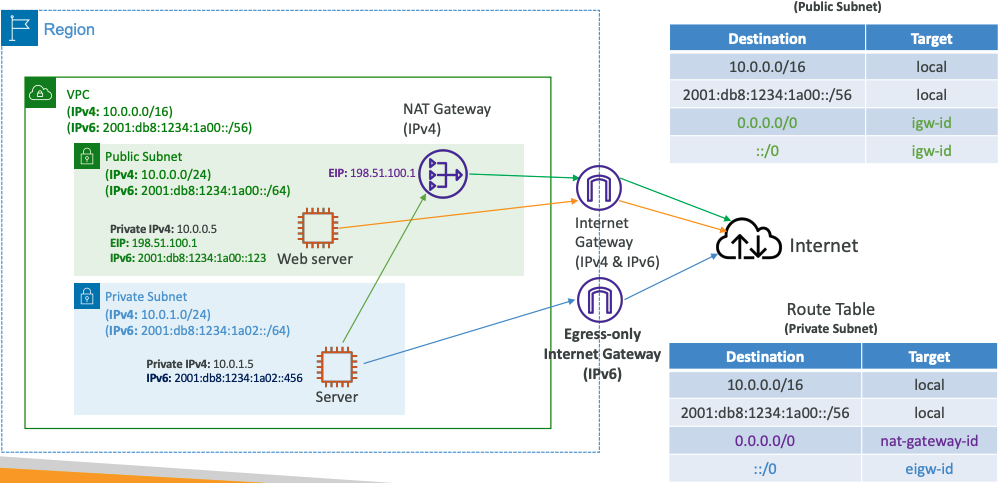
# Egress-only Internet Gateway
- Used for IPv6 only
- (similar to a NAT Gateway but for IPv6)
- Allows instances in your VPC outbound connections over IPv6 while preventing the internet to initiate an IPv6 connection to your instances
- You must update the Route Tables
# IPv6 Routing
# Summary
- CIDR – IP Range
- VPC – Virtual Private Cloud => we define a list of IPv4 & IPv6 CIDR
- Subnets – tied to an AZ, we define a CIDR
- Internet Gateway – at the VPC level, provide IPv4 & IPv6 Internet Access
- Route Tables – must be edited to add routes from subnets to the IGW, VPC Peering Connections, VPC Endpoints, …
- Bastion Host – public EC2 instance to SSH into, that has SSH connectivity to EC2 instances in private subnets
- NAT Instances – gives Internet access to EC2 instances in private subnets. Old, must be setup in a public subnet, disable Source / Destination check flag
- NAT Gateway – managed by AWS, provides scalable Internet access to private EC2 instances, IPv4 only
- Private DNS + Route 53 – enable DNS Resolution + DNS Hostnames (VPC)
- NACL – stateless, subnet rules for inbound and outbound, don’t forget Ephemeral Ports
- Security Groups – stateful, operate at the EC2 instance level
- Reachability Analyzer – perform network connectivity testing between AWS resources
- VPC Peering – connect two VPCs with non overlapping CIDR, non-transitive
- VPC Endpoints – provide private access to AWS Services (S3, DynamoDB, CloudFormation, SSM) within a VPC
- VPC Flow Logs – can be setup at the VPC / Subnet / ENI Level, for ACCEPT and REJECT traffic, helps identifying attacks, analyze using Athena or CloudWatch Logs Insights
- Site-to-Site VPN – setup a Customer Gateway on DC, a Virtual Private Gateway on VPC, and site-to-site VPN over public Internet
- AWS VPN CloudHub – hub-and-spoke VPN model to connect your sites
- Direct Connect – setup a Virtual Private Gateway on VPC, and establish a direct private connection to an AWS Direct Connect Location
- Direct Connect Gateway – setup a Direct Connect to many VPCs in different AWS regions
- AWS PrivateLink / VPC Endpoint Services:
- Connect services privately from your service VPC to customers VPC
- Doesn’t need VPC Peering, public Internet, NAT Gateway, Route Tables
- Must be used with Network Load Balancer & ENI
- ClassicLink – connect EC2-Classic EC2 instances privately to your VPC
- Transit Gateway – transitive peering connections for VPC, VPN & DX
- Traffic Mirroring – copy network traffic from ENIs for further analysis
- Egress-only Internet Gateway – like a NAT Gateway, but for IPv6